
Imagine spending £800 on a bulk order of custom hoodies for a London event, only to open the box and find your logo looks like a blurry mess from a 1990s video game. This is a common disaster for first-time buyers who don't have the right artwork format ready. You want your brand to look sharp, not pixelated. We know that technical jargon like raster and DPI can feel like a headache when you just want a decent t-shirt. This guide explains exactly what is a vector file for printing and why it's the only way to get professional-grade results.
You'll learn how to spot a bad file, how to get a vector without being a pro designer, and how to ensure your next order arrives looking perfect. We’ll break down the difference between file types and give you the tools to order with total confidence. We know what you want, and we make sure you get high-quality merchandise on time, everytime.
Key Takeaways
- Master exactly what is a vector file for printing to ensure your custom merchandise looks sharp and professional every time.
- Learn why standard pixels fail where mathematical paths succeed, giving you total "resolution independence" for any size print.
- Identify the correct file formats like AI and EPS, and discover why a PDF file might still be hiding low-quality raster images.
- Use our 10-second zoom test to verify your artwork’s quality instantly on your desktop without needing specialist software.
- See the direct path from a digital vector file to a premium screen-printed hoodie or embroidered cap that makes your brand stand out.
What is a Vector File for Printing? A Simple Definition
You want your brand to look sharp. At RAW Merch, we've spent over 25 years helping clients create high-quality custom clothing and products. When you start a project with us, the first thing we'll ask for is a vector file. So, what is a vector file for printing and why does it matter so much? Put simply, a vector file is a graphic built from mathematical paths rather than a fixed grid of coloured squares.
Most images you use daily, like JPEGs or PNGs, are raster images. These are made of pixels. If you try to stretch a small pixel-based image to fit a large hoodie or a banner, it becomes blurry and "crunchy." Vector graphics are different. Because they use points, lines, and curves based on mathematical equations, they don't lose quality when resized. We know what you want; you want your logo to look as good on a tiny zip pull as it does on a massive backdrop. That's exactly what vectors allow us to do.
The "Infinite Scaling" Advantage
The biggest benefit of a vector is its ability to scale infinitely. When you zoom into a standard photo, you eventually see the individual pixels. This is called pixelation, and it's the enemy of quality print. A vector maintains a perfectly clean edge regardless of the magnification level. This is vital for the variety of merchandise we produce. Whether we are printing 50 small enamel badges or 500 large-format event banners, the vector file ensures the lines remain crisp and the details stay intact. YOU WANT IT, WE CREATE IT! Starting with a vector ensures the creation process is flawless.
Why Printers specifically demand Vectors
Professional printing machines don't "see" an image the way a computer screen does. Equipment like vinyl cutters, embroidery machines, and screen-print carousels follow the paths in a vector file like a digital map. These paths tell the machine exactly where to move, cut, or apply ink with 100% accuracy. There are three main reasons we require them:
- Precision: Machines follow the mathematical lines for a perfect finish every time.
- Colour Separation: Vectors allow us to easily separate colours for screen printing, ensuring each layer of ink is placed perfectly.
- Cost Efficiency: Providing the right file first time means you avoid artwork recreation fees. It keeps your costs down and your delivery on schedule.
We deliver on time everytime because we don't guess with your designs. By using a vector file, we ensure your custom merchandise looks professional from the very first print. It's the industry standard for a reason, and it's the best way to protect your brand's visual integrity.
Vector vs. Raster: Why Pixels Fail Where Paths Succeed
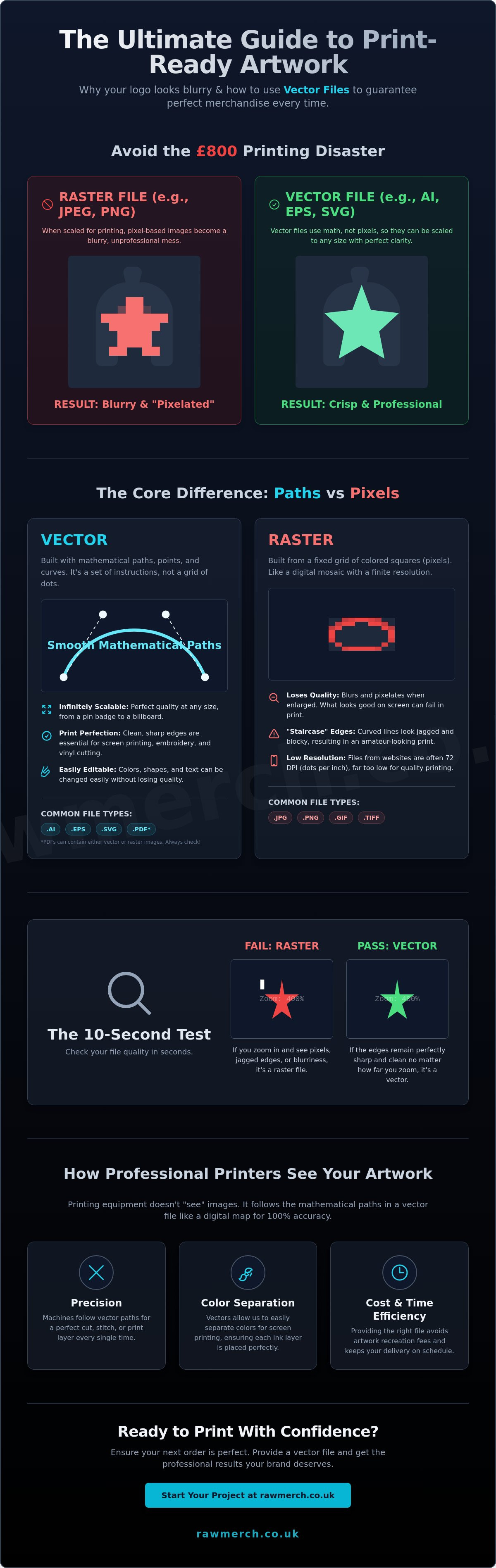
JPEG files are raster images. They are built from a fixed grid of coloured pixels. Think of it like a mosaic. If you get too close, the image breaks apart into blocks. An AI or EPS file is a vector. It does not use pixels at all. Instead, it uses mathematical paths to define shapes. This structural difference is the core reason why knowing what is a vector file for printing is vital for your brand.
Resolution independence is the term for this flexibility. A raster image has a set limit. You might think your 3000-pixel JPEG is enough. On a standard laptop screen, it looks huge. Printing is different. When we scale that image up for a large chest print, the software must fill the gaps. It creates interpolated pixels that look muddy and dull. Vectors rely on geometry, not dots. This is why the standards for Scalable Vector Graphics (SVG) are so important in modern design. They allow a logo to be scaled to the size of a billboard without losing a single drop of detail.
The Problem with Raster Images in Apparel Print
Modern techniques like DTF (Direct to Film) and traditional screen printing require hard, clean edges to create a film or a stencil. When you provide a raster file with soft edges, the print looks amateur. You will see the staircase effect. This is where curved lines look jagged and blocky because the printer is trying to interpret a low-resolution curve. Most logos pulled from a website are 72dpi. These are designed for fast loading on a phone, not for physical products. Using these for clothing is the fastest way to ruin a production run.
Mathematical Precision for Band and Brand Logos
Vectors preserve the exact geometry of your fonts and symbols. If your brand uses specific Pantone colours, vector files make these easy to assign and track. You cannot accurately lock a spot colour to a blurry pixel. Consistency is everything when you are building a brand. High-quality artwork leads to professional results and higher merch table sales. Read our guide on band merchandise to see how professional branding drives fan engagement.
We know what you want; you want gear that looks as good as your music sounds. We deliver on time everytime because we start with the right files. If you are struggling with your current artwork, contact us for a no obligation quote and let our team take a look.
Common Vector File Formats: AI, EPS, PDF, and SVG
Understanding what is a vector file for printing starts with the file extension. Vector is the category, but the extension tells us which software created the artwork. According to Britannica's definition of vector graphics, these files use mathematical paths rather than pixels to define shapes. At RAW Merch, we have spent 25 years handling every file type imaginable. We know that the right format is the difference between a crisp logo and a blurry mess on your custom hoodies.
The "Big Four" Vector Formats Explained
- .AI (Adobe Illustrator): This is the industry standard. It's the native format for the world's most powerful design software. If your designer provides an .AI file, it's the gold standard for merchandise production.
- .EPS (Encapsulated PostScript): Think of this as the "universal" vector. It's compatible with older machinery and various design programmes. It's a reliable choice for large-scale banners or complex screen printing.
- .PDF (Portable Document Format): Everyone uses PDFs because they're easy to view. However, they're only useful for printing if they were exported correctly from vector software.
- .SVG (Scalable Vector Graphics): These are primarily for websites because they're lightweight. We can use them for simple logos, but they aren't always ideal for complex, multi-layered merchandise designs.
The PDF Trap: When a Vector Isn't a Vector
Don't be fooled by the file extension. A common mistake is opening a low-resolution JPEG and simply clicking "Save as PDF." This doesn't magically turn pixels into math. The PDF acts as a "wrapper." If there's a blurry image inside that wrapper, it stays blurry. To get a "Print-Ready" PDF, your designer must export it directly from Illustrator or CorelDRAW. If you can't zoom in 800% without seeing pixels, it's not a true vector file. We need the actual mathematical data, not just a picture of it.
Don't Forget to Outline Your Fonts
This is the top reason print jobs get delayed. If you use a specific font for your brand, our computers might not have it installed. When we open your file, the system will replace your custom font with something generic like Arial. This ruins your branding instantly. To prevent this, your designer must "Create Outlines" or "Convert to Curves." This turns the text into a solid shape. Once it's a shape, it's no longer a font; it's a piece of art that prints perfectly every time.
- Preferred: .AI or .EPS files.
- Accepted: High-resolution .PDF (must be vector-based).
- Required: All fonts must be converted to outlines.
- Avoid: .PNG or .JPG files for screen printing or embroidery.
We know what you want; we deliver on time everytime. Sending the correct format ensures your creative vision becomes a reality without any technical hiccups.
How to Tell if Your File is a Vector (The 10-Second Test)
You don't need expensive graphic design software to check your artwork. Most clients think a file ending in .pdf is automatically a vector, but that isn't always the case. A PDF can act like a container for a low-quality, blurry photo. To ensure your custom clothing looks professional, you must verify the file quality before sending it to production. This simple check saves you time and prevents printing delays.
The Zoom Test
This is the fastest way to confirm what is a vector file for printing. Open your file in a standard web browser like Chrome or Safari, or use a basic PDF viewer. Find a curved edge or a piece of text and zoom in to 400% or even 800%.
- The Vector Result: The lines remain razor-sharp and perfectly smooth. No matter how much you zoom, the quality never drops. This is exactly what we need for high-quality screen printing.
- The Raster Result: The edges look jagged, blurry, or like a series of small squares. If it looks like a staircase or a collection of bricks, it's a raster image and will likely look poor on your merchandise.
What if I only have a JPEG?
If your 10-second test reveals a pixelated mess, don't panic. Many businesses start with just a JPEG or PNG. However, you should avoid free "Auto-Trace" tools found online. These tools often produce jagged, wonky lines that look amateurish when printed on a hoodie or t-shirt. They lack the precision required for complex band art or intricate corporate logos. We have seen hundreds of designs ruined by automated software that cannot distinguish between a shadow and a solid line.
Your first move should be contacting your original designer. Ask them for the "source files" or "outlined files." Most professionals will have these saved as .ai or .eps formats. If those aren't available, you'll need a professional redrawing service. At RAW Merch, we've spent over 25 years perfecting the art of vectorisation. We take your low-resolution images and manually redraw them to ensure every line is crisp and print-ready. We know what you want; we deliver on time everytime.
Getting Your Merch Created: From Vector to Finished Product
You have done the hard work. You have designed your logo and you finally understand what is a vector file for printing and why it is the gold standard for custom apparel. Now comes the exciting part. We take those digital paths and anchor points and turn them into physical products that represent your brand. At RAW Merch, we bridge the gap between your screen and the street.
The transition from a digital file to a screen-printed hoodie or an embroidered cap requires technical precision. We don't just "hit print" and hope for the best. We use your vector files to create the screens for our presses or the digitised paths for our embroidery machines. This ensures every line is crisp and every colour is vibrant. We know what you want. You want gear that looks professional and lasts through a hundred washes. By starting with the right file type and utilizing expert resources like Its All About Prints limited for high-quality custom results, you ensure that your brand identity remains consistent across every item in your collection.
RAW Merch Expertise: 25 Years of Precision
Experience matters in the printing industry. With over 25 years of hands-on expertise, our team understands the nuances of fabric and ink. We review every single file that comes through our system. If a line is too thin to hold ink or a font is too small to embroider, we catch it before production starts. This commitment to detail is why we are known for delivering on time everytime. Our reputation is built on reliability and the technical ability to handle complex designs without compromising on quality.
- File Audits: We check your artwork for resolution and scalability to avoid pixelation.
- Technical Support: If your file isn't quite ready, we provide clear feedback on how to fix it.
- Quality Control: We maintain high standards from the first shirt to the thousandth.
If you want to dive deeper into the technical side of things, read our Pillar Guide on Vector Images for more details on why these files are so vital for high-quality results. Understanding what is a vector file for printing is the first step toward a perfect final product.
Ready to Print? Contact RAW Merch Today
YOU WANT IT, WE CREATE IT! Our philosophy is simple. We want to make the process of ordering custom merchandise as easy as possible for you. Whether you are ordering for a small business or a massive UK-wide event, we provide the same level of care and precision. We handle bulk orders with ease and ensure your brand looks its best on every garment.
Are you still confused about your file types? Don't stress. Our team of specialists is ready to guide you through the process. Reach out to us via our website to submit your enquiry for bulk orders. Contact us today for all enquiries and for a no-obligation quote. Send us your files and let us show you why we are the trusted partner for UK custom merch. We take the guesswork out of printing so you can focus on growing your brand.
Get Your Merch Right the First Time
Now you know exactly what is a vector file for printing and why it's the secret to crisp, professional merchandise. By choosing paths over pixels, you ensure your brand looks sharp on everything from screen-printed t-shirts to embroidered caps. A quick zoom test on your AI or EPS file is all it takes to avoid a blurry disaster. Don't let low-quality artwork hold your brand back when you can get it right from the start.
At RAW Merch, we've spent over 25 years perfecting the art of UK printing. We don't just take your file and hope for the best. Our team performs an expert file review on every single order to guarantee perfection. You want it, we create it; and we deliver on time everytime. Whether you're launching a new brand or need event kit, we're the seasoned specialists who get the job done without the fuss.
CONTACT US FOR A NO-OBLIGATION MERCH QUOTE
Let's get your project moving today. Your vision deserves high-quality results that make a real impact.
Frequently Asked Questions
Can I turn a PNG into a vector file just by changing the extension?
No, changing a file extension from .png to .ai does not create a vector. It is a common mistake that 15% of new clients make, but it just creates a broken file our machines cannot read. You are simply putting a pixel image inside a vector container. To get a true vector, a designer must manually redraw the lines using mathematical paths. This ensures your custom merch looks crisp and professional when it is printed.
Why does my vector file look blurry when I open it in Photoshop?
Your vector looks blurry because Photoshop is pixel-based software. When you open a vector file, Photoshop rasterises it, which means it turns those clean mathematical lines into a grid of fixed pixels. To keep your lines sharp and scalable for your custom merch, always view and edit vector files in dedicated vector software like Adobe Illustrator or CorelDRAW. We use these tools to ensure every print is perfect.
Is a high-resolution 300 DPI JPEG as good as a vector for t-shirt printing?
A 300 DPI JPEG is high quality, but it is not as good as a vector for t-shirt printing. When you ask what is a vector file for printing, you are looking for total scalability. JPEGs have a fixed size and a background that is difficult to remove for screen printing. A vector allows us to scale your logo from a small 2cm tag to a 40cm back print without losing any detail.
What software do I need to open an .AI or .EPS file?
You need professional design software like Adobe Illustrator or CorelDRAW to fully edit these files. If you just need to view them, use free tools like Inkscape or even a standard web browser. We use these industry-standard tools to make sure your designs are perfect before we start the screen printing process. It's how we ensure your brand looks its best. YOU WANT IT, WE CREATE IT!
I found my logo on my website; can I use that for a bulk hoodie order?
No, website logos are usually 72 DPI and under 100KB, which is far too small for a bulk hoodie order. If we enlarge that for a 30cm chest print, it will look blocky and unprofessional. You need a vector to ensure your merchandise looks sharp and high-end. We have handled over 10,000 orders and know that starting with the right file is the only way to deliver on time everytime.
What does it mean to "convert text to outlines" in a vector file?
Converting text to outlines means turning your fonts into permanent vector shapes. If you don't do this, our computers might replace your unique font with a basic one if we don't have it installed in our system. This simple step ensures your brand identity stays consistent across every single piece of custom clothing we produce for you. It prevents errors and keeps your production schedule on track without any delays.
Can photos (like a band member portrait) be vectorised for printing?
Yes, photos can be vectorised, but they will lose their photographic detail and look more like a stylised illustration or a stencil. This is a popular technique for 1-colour screen printing on band shirts. For 100% photographic accuracy on your garments, we typically recommend DTF printing using a high-resolution 300 DPI raster file instead. We'll help you choose the best method for your specific artwork and budget.
Why is my PDF file size so small if it contains a high-quality vector?
Vector PDFs are small because they use mathematical coordinates instead of millions of individual pixels. A 500KB vector PDF can hold more detail than a 10MB JPEG. This is exactly what is a vector file for printing; it is efficient data that tells our machines where to move. It is the best way to get clean, sharp results on your custom clothing without dealing with massive, slow-loading files.