
You’ve perfected your design. You’re ready for custom merch. But then the email lands: ‘File rejected.’ Or worse, your t-shirts arrive and your sharp logo looks like a blurry, pixelated mess. It’s a frustrating, time-wasting problem that holds up your entire project. The culprit is almost always your file type. To get professional results, you need to understand what is a vector based image and why it’s the non-negotiable standard for quality printing.
Forget the confusing jargon and endless back-and-forth with your printer. This is your no-nonsense guide. We’ll break down exactly what a vector is, how it guarantees your design stays crisp at any size, and how to make sure you have the right artwork every single time. Get ready to save time, avoid extra costs, and ensure your merch looks as professional as you imagined. Let's get it done right.
The Simple Answer: Vector vs. Raster Images Explained
If you’ve ever ordered custom merchandise, you've probably heard this question: "Can you send your logo in vector format?" It’s a common request, and for good reason. To get the best results for your print, you need the right file for the job.
All digital graphics fall into two main categories: vector or raster. Understanding the difference is crucial for getting crisp, professional prints every single time. The easiest way to think of it is this: a raster image is a photograph, while a vector image is a blueprint.
What is a Raster Image? (Made of Pixels)
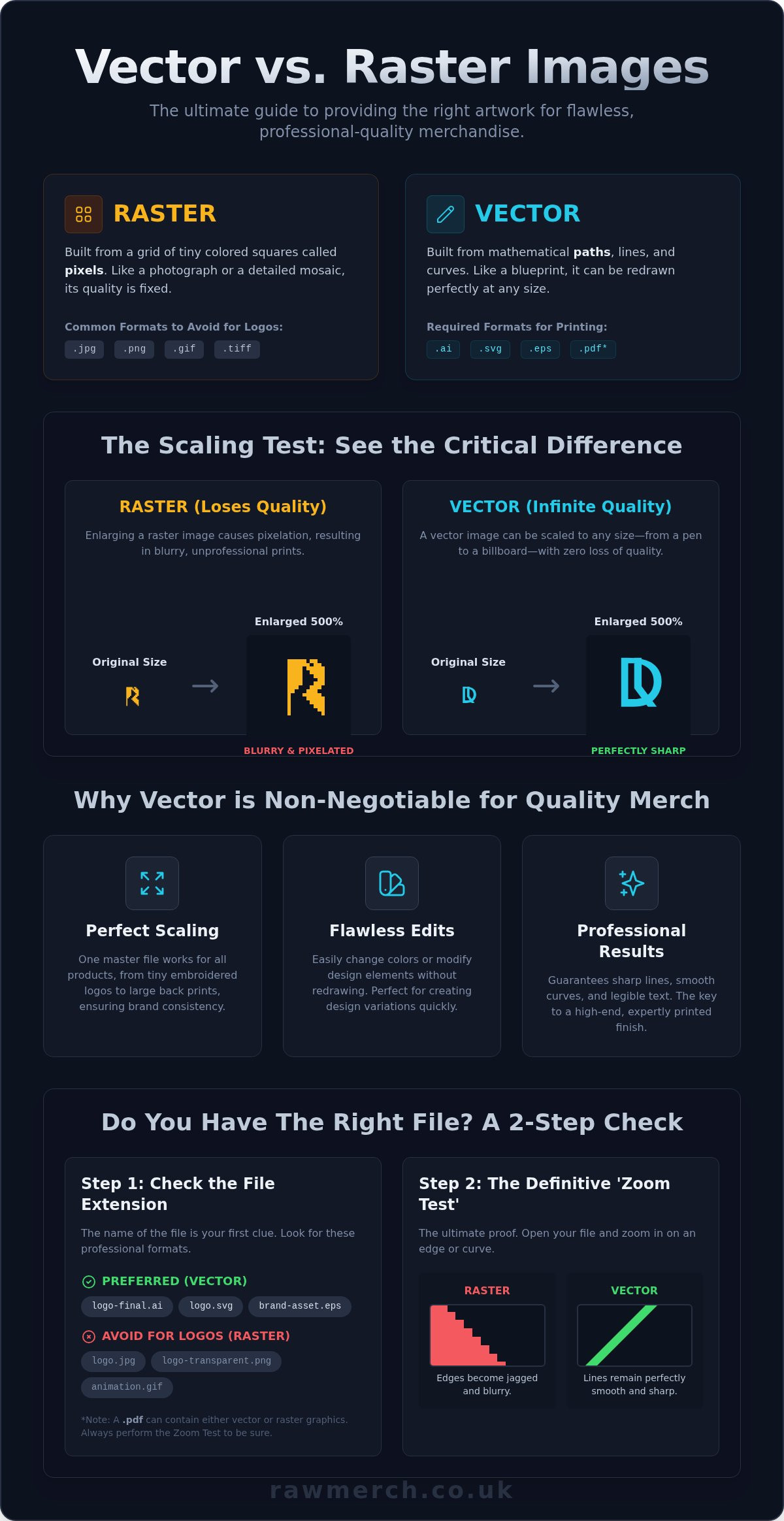
A raster image is built from a fixed grid of tiny, coloured squares called pixels. Common examples you see every day include JPG, PNG, and GIF files. Imagine a detailed mosaic-from a distance, you see a clear picture, but up close, it’s just a collection of individual tiles. Raster images work the same way. Their biggest weakness? They don’t scale well. Try to enlarge a raster file, and it will become blurry, jagged, and unprofessional. This is called pixelation.
What is a Vector Image? (Made of Mathematical Paths)
So, what is a vector based image? Instead of pixels, a vector is built using mathematical equations that define points, lines, and curves. These formulas define the shapes in what are known as Vector graphics, allowing the computer to redraw the image perfectly at any size. This means you can scale a vector logo from the size of a postage stamp to the side of a building, and it will remain perfectly sharp and clear. There is zero loss of quality. Common vector file types include AI, EPS, SVG, and some PDFs.
Visual Comparison: See the Difference When Scaled
The difference becomes undeniable when you see it side-by-side. Imagine a company logo enlarged to 500% its original size.
- The Raster Image (e.g., a JPG): The edges are blurry and jagged. The colours look muddled, and you can clearly see the individual square pixels that make up the image. It looks low-quality and unprofessional.
- The Vector Image (e.g., an SVG): The lines are perfectly smooth, the curves are clean, and the colours are solid. It looks just as crisp and sharp as it did at its original size. This is the quality we demand for your merchandise.
This is why we always ask for vector files for your designs. They guarantee a flawless print, every time.
Why Vector Files are Essential for High-Quality Merch
You understand the technical side, but why does it actually matter for your brand? The answer is simple: quality. When you invest in custom merchandise, you want it to look professional, sharp, and impressive. At RAW Merch, we require vector files for most printing methods because they are the only way to guarantee a flawless result. Understanding what is a vector based image is the difference between merch that elevates your brand and merch that looks amateur.
This is where the theory meets reality. Using the right file format is the foundation for merchandise that makes an impact, and here’s exactly why.
Perfect Scaling for Any Product
A single vector file is your master key for all merchandise. Use the exact same file for a small, embroidered logo on a cap and a huge print on the back of a hoodie or a promotional banner. Because vectors are based on mathematical equations, they scale infinitely without losing a single bit of quality. This ensures absolute consistency across your entire product range and is essential for printing methods like screen printing, which demand clean, precise separations for each colour.
Flawless Edits and Colour Adjustments
Need to change your design on the fly? With vector files, it’s no problem. Every line, shape, and colour in a vector design is an individual object. This means our team can easily change the colour of your logo-for instance, from white for a black t-shirt to black for a white one-in seconds. This flexibility, as explains Adobe, is because vector files are built from editable paths, not fixed pixels. We can isolate or remove elements without redrawing the entire image, ensuring a fast and accurate production process.
The Key to Crisp, Professional Results
The number one sign of unprofessional merch is a blurry, pixelated print. This happens when a low-resolution raster file (like a JPEG or PNG) is stretched too far. Vector files eliminate this risk entirely. They produce perfectly sharp, clean lines and smooth curves at any size. This precision is critical for detailed logos and small text on clothing, ensuring every part of your design is legible and looks expertly printed. It’s the secret to a finish that screams quality.
Want professional results? Start your project with the right files.
How to Identify a Vector File (And What to Look For)
You understand the theory, but how do you spot a vector file in the wild? It’s a common problem. Your designer sends you a folder of logos, but you’re not sure which one to send us for printing. Don't worry. We'll show you exactly how to check the files you have, so you can be confident you’re providing the right artwork for a flawless finish. This is where knowing what is a vector based image becomes a practical skill.
Check the File Extension
The file name is your first clue. While not foolproof, the extension at the end of the file name (like logo.ai) is the fastest way to see what you're dealing with. We need files that are built for infinite scaling.
Look for these common vector formats:
- .ai: Adobe Illustrator. The industry standard for vector creation.
- .eps: Encapsulated PostScript. A widely compatible vector format.
- .svg: Scalable Vector Graphics. Perfect for web and also great for print.
- .pdf: Portable Document Format. This one is tricky. A PDF can be a true vector, but it can also just be a container for a raster image like a JPG. Always perform the test below.
Avoid these common raster formats for logos and line art: .jpg, .png, .gif, .tiff.
The 'Zoom Test': A Simple Way to Check
This is the definitive test. You don't need expensive software-often, even your web browser will work. Open the file in any program that allows you to view it and zoom in. Magnify the image as much as you can, focusing on a curve or an edge.
What do you see?
- Sharp, clean edges: If the lines remain perfectly smooth and crisp no matter how close you get, congratulations! You have a vector file.
- Blurry or blocky edges: If the image becomes pixelated, fuzzy, or you start seeing little squares, it’s a raster image.
Why Your PNG or JPG Logo Isn't a Vector
We see this all the time: a client saves their .jpg logo as a .eps file and thinks it has been converted. This is a critical mistake. Simply changing a file's extension or saving it in a different format does not change its core structure. The file is still a pixel-based raster image, just hiding inside a vector container. Think of it like putting a printed photo inside a folder-it doesn't magically turn the photo into a technical blueprint. True conversion requires a professional to manually redraw the image using vector software.
“I Don’t Have a Vector File!” - Your Next Steps
Realised you don’t have the right file? Don’t panic. It’s a common problem, and we have a simple, no-nonsense plan to get you sorted. Now that you understand the basics of what is a vector based image, here’s how to get the file you need for a perfect print.
Follow these steps to track down your artwork. Your best bet is always the original source.
Step 1: Contact the Original Designer or Agency
This is the fastest and most reliable route. The person or agency who created your logo or design will have the original source files. Reach out and ask them for the ‘vector file’ or ‘original artwork’. They’ll know exactly what you mean. Use this simple email template to make it easy:
Subject: Request for Vector Logo File
Hi [Designer's Name],
Hope you're well.
We're placing an order for some custom merchandise and need the vector version of our logo. Could you please send over the original source file (e.g., .AI, .EPS, or .SVG) when you have a moment?
Thanks,
[Your Name]
Step 2: Check with Your Internal Marketing Team
If you work for a larger company, there’s a good chance your brand assets are stored centrally. Your marketing, brand, or communications department is the first place to look. Ask them for access to the company's brand guidelines or digital asset library. The correct vector logo will almost certainly be in there, ready for you to use.
Creative businesses are a great example of this. A publishing house like Wydawnictwo AORA must manage countless high-quality vector files for everything from their own logo to the intricate artwork on book covers, making an organized asset library essential for their marketing teams.
Step 3: Consider a Redraw or Vectorization Service
If the original file is lost for good, your final option is to have it recreated. A graphic designer can take a high-resolution raster image (like a JPEG or PNG) and manually trace it to create a new, clean vector file. This process is called vectorization or a 'redraw'.
You can find freelance designers in the UK on platforms like Upwork or Fiverr who offer this as a service, often for a reasonable one-off fee (typically starting from £20-£50 depending on complexity). While automated online tools exist, a professional designer will deliver a far superior and more accurate result for your merchandise.
Once you have your vector file, you’re ready to go. Our team at RAW Merch is standing by to turn your design into high-quality custom merchandise.
Submitting Your Vector Artwork for Perfect Merch
Now that you understand what is a vector based image and why it’s the gold standard for custom printing, you’re ready for the final step. At RAW Merch, we make turning your design into reality a straightforward process. We've built our reputation on quality and reliability, and that starts with getting your artwork right from the very beginning.
To ensure your t-shirts, hoodies, and other products look sharp, clean, and exactly as you imagined, follow these simple guidelines. We're here to make it easy.
Key Requirements for Print-Ready Files
Getting your file ready for us is simple. To avoid any delays and guarantee the highest quality print, please check these three key points before sending us your design:
- Outline Your Fonts: This is crucial. Outlining fonts converts any text in your design into fixed shapes. This ensures that the typography looks exactly as you designed it, without any risk of font substitution on our end.
- Embed All Images: If your vector design includes any linked raster elements (like a photograph), they must be embedded within the file. This packages everything together and prevents missing image errors.
- Use the Right File Format: For the best results, we need your original vector file. Please submit your artwork as an AI (Adobe Illustrator), EPS, or a high-quality PDF saved with editing capabilities.
Our Artwork Proofing Process
Your vision is our command. We never start production until you are 100% happy with how your design will look. Once we receive your file, our expert team will prepare a digital mock-up for your approval. This proof will show you the exact size, placement, and colours of your artwork on the merchandise you’ve chosen.
This step is our quality guarantee. It gives you complete peace of mind and ensures the final product is flawless. No surprises, just professional results.
Ready to Create Your Merch?
Understanding what is a vector based image is the key to creating incredible custom gear. You've done the prep work, and now it’s time for us to bring it to life. With over 25 years in the industry, we know how to deliver quality products on time, every time.
You've got the knowledge. Let's get your project started today!
Your Vision, Printed Perfectly
Understanding what is a vector based image is the crucial first step towards flawless custom merchandise. The difference is clear: vector files use mathematical formulas to ensure your design can be scaled to any size without ever becoming blurry or pixelated. This is why they are the non-negotiable standard for professional printing. Armed with this knowledge, you are now ready to get your project started with complete confidence.
When you're ready to create, trust the experts to bring that design to life. At RAW Merch, we have over 25 years of hands-on printing experience, mastering everything from screen printing to DTF. We turn your perfect vector files into incredible products, and we deliver on time, every time. Your vision is our mission.
Got your vector file ready? Get a no-obligation quote for your custom merch!
Frequently Asked Questions
Can a PDF file be a vector file?
Yes, a PDF can be a vector file, but it depends entirely on how it was created. A PDF is a container that can hold both vector and raster (pixel-based) graphics. If you create a design in a vector program like Adobe Illustrator and save it as a PDF, it will contain vector data.
However, simply saving a JPG or a raster image as a PDF does not convert it into a vector. For professional printing, we need a PDF that was originally built using vector artwork.
Why can't you just use the high-resolution JPG from my website?
Website images, even those labelled "high-resolution," are optimised for screen viewing at 72 DPI. Professional printing requires at least 300 DPI to look sharp. More importantly, a JPG is a raster file made of pixels. When enlarged for a t-shirt or banner, it becomes blurry and jagged.
This is the key difference when you ask what is a vector based image; vectors use mathematical paths, not pixels. This allows them to be scaled to any size without losing quality, ensuring a crisp, professional finish every time.
What's the difference between a vector EPS and a Photoshop EPS?
A true vector EPS is created in software like Adobe Illustrator. It is built from mathematical points, lines, and curves, making it infinitely scalable. This is the format we need for clean, sharp printing of logos and graphics, especially for methods like screen printing.
A Photoshop EPS, on the other hand, is usually just a raster image (pixels) saved inside an EPS container. It cannot be scaled up without losing quality and becoming pixelated. Always create your artwork in a vector program for the best results.
Do I need a vector file for every type of printing?
For most professional merchandise, yes. A vector file is essential for screen printing, embroidery, and large-format printing to ensure clean lines and perfect scalability. It guarantees your logo or design looks sharp and professional, regardless of the final print size.
The main exception is for full-colour photographic prints using methods like DTG (Direct-to-Garment). For these, a high-resolution raster file (like a 300 DPI PNG or TIFF) can work well. However, a vector is always the most versatile and reliable file type to have.
How do I turn my drawing into a vector image for a t-shirt?
First, you need to digitise your drawing. Scan it or take a very clear, high-quality photograph. Once you have the digital image, you'll need to use vector software like Adobe Illustrator to trace it. You can use an auto-trace function for simple designs or manually trace it with the Pen Tool.
This process, called vectorisation, converts your hand-drawn lines into clean, scalable vector paths. This is the critical step to prepare your artwork for professional t-shirt printing.
What is the best vector file format for t-shirt printing?
The industry standards for vector files are AI (Adobe Illustrator), EPS (Encapsulated PostScript), and SVG (Scalable Vector Graphics). We can work with any of these formats. An AI file is the native source file, while an EPS is a universal standard that most printers accept.
A vector-based PDF is also an excellent choice, as long as it was saved correctly from a vector program. Providing any of these file types ensures we have the scalable artwork needed for a perfect print.