
Your brand's reputation is only as sharp as your lowest resolution file. For over 25 years, we've seen great designs ruined because the file wasn't ready for the press. You've likely felt the frustration of a "low quality" warning or seen a blurred logo turn a £250 batch of custom hoodies into a disappointment. It's a common headache when you're stuck between paying a designer £45 an hour and trying to master converting jpeg to vector for free on your own. We know what you want, and it's professional results without the professional price tag.
This guide shows you the exact process to transform those blurry edges into crisp, scalable lines that look flawless on any piece of custom clothing. You'll learn how to create high-resolution logos that scale to any size, ensuring your next order with RAW Merch is perfect. We're breaking down the best free tools available in 2024 and the simple steps to prepare your files for a flawless print run every time.
Key Takeaways
- Stop settling for blurry prints and learn why professional printers demand "infinity scale" vector files for high-quality custom merch.
- Master the process of converting jpeg to vector for free using the best browser-based tracers and open-source software available today.
- Discover the expert settings, like adjusting threshold levels, to ensure your logo stays sharp and detailed during the conversion process.
- Avoid common mistakes like "node overload" or saving JPEGs inside PDFs, which can stall your production and ruin your print quality.
- Turn your finished design into premium clothing by sending your vector to RAW Merch for a no-obligation quote.
Why Do Printers Require Vector Files for Merchandise?
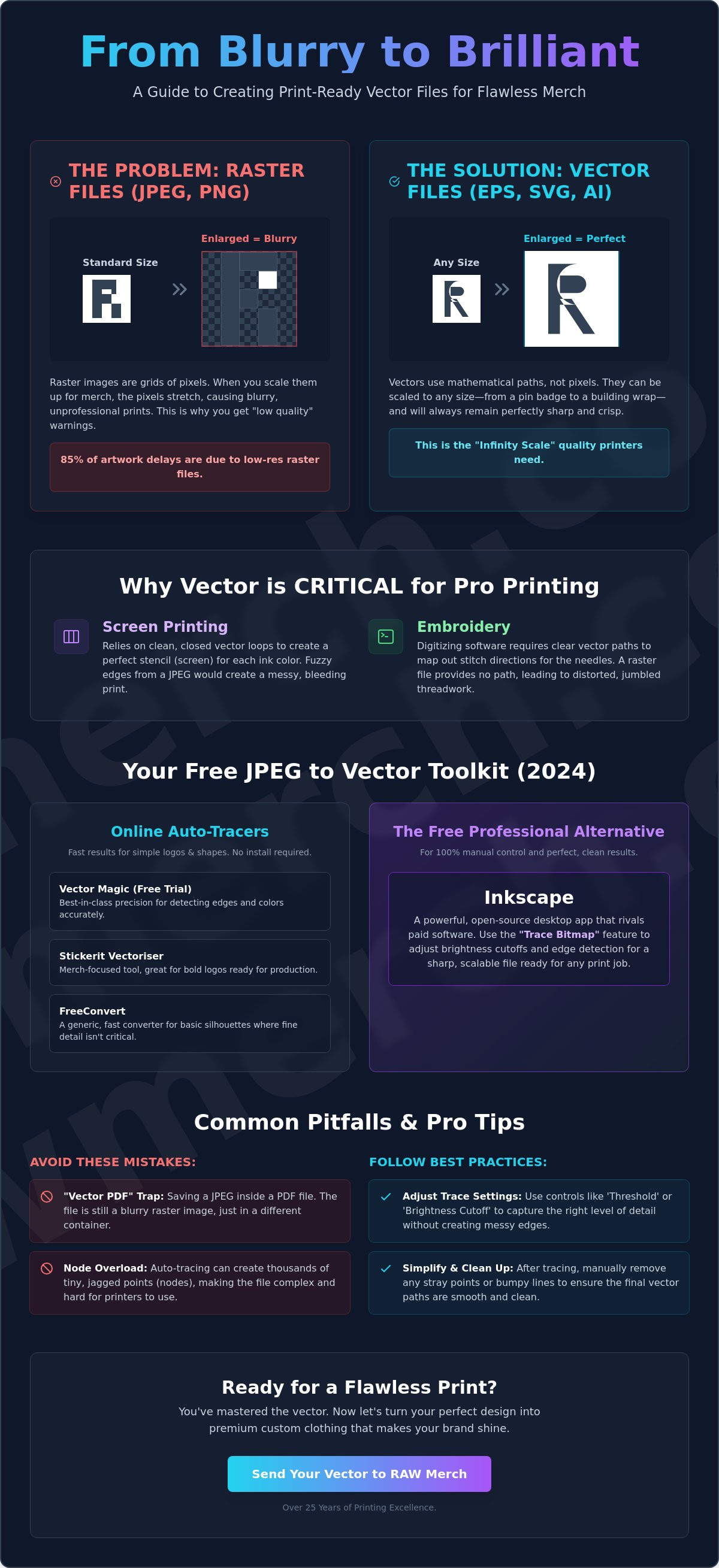
At RAW Merch, we've spent over 25 years perfecting the art of custom clothing. We know what you want; you want your logo to look sharp, professional, and exactly like your original design. JPEGs are fine for social media, but they fail on a printing press. A JPEG is a raster file, which means it's made of fixed pixels. When you try to scale that image up for a large hoodie print or a banner, those pixels stretch and blur. This is why converting jpeg to vector for free is a vital step for any brand owner looking to save money while maintaining quality.
Vectors work on a principle called the "Infinity Scale." Instead of pixels, they use mathematical equations to define shapes, lines, and colours. You can enlarge a vector file to the size of a football pitch or shrink it down for a pin badge; it will never lose quality. Understanding what vector files are is the first step to ensuring your merchandise looks world-class. Even a high-resolution JPEG is not a substitute for a true vector file because it lacks the underlying geometry that professional machinery requires.
The Problem with Pixelation in Bulk Printing
A raster image is a grid of coloured squares that break when stretched. This is the core reason JPEGs "blur" when they are enlarged for merchandise like hoodies or large-format banners. When those squares become visible, you get "fuzziness" at the edges of your logo. This ruins the crispness of the print and makes your branding look amateur. In professional production, 85% of artwork-related delays are caused by low-resolution raster files that simply aren't fit for purpose. We don't guess with your brand; we ensure every line is sharp before the ink hits the fabric.
Vector Paths and Printing Techniques
Modern printing isn't just about laying down ink; it's about guiding physical machinery with precision. Screen printing relies on colour separations where each individual colour needs a clean, closed vector loop to create a perfect stencil. If you are still wondering what is a vector based image, think of it as a digital map for our equipment.
This is especially critical for embroidery. Embroidery digitising software requires clear vector lines to map out stitch paths for the needles. Without these paths, the software can't determine where a stitch starts or ends, leading to messy, distorted designs. YOU WANT IT, WE CREATE IT! By converting jpeg to vector for free using the right tools, you provide the clean data needed for DTF, screen printing, and embroidery. We deliver on time everytime because we start with the right files.
Top Free Tools for Converting JPEG to Vector
Choosing the right tool determines whether your merch looks professional or like a pixelated mess. You have two main paths: browser-based auto-tracers for speed or desktop software for precision. Browser tools offer "one-click" convenience, which is great for simple shapes. However, they often struggle with complex gradients or fine lines. Jagged edges and blurry lines are common pitfalls when you use low-quality raster files for screen printing. If you want total control, manual tracing in desktop software is the only way to guarantee a perfect finish.
Best Online Auto-Tracers (No Install Required)
- Vector Magic (Free Trial): This tool stands out for its sub-pixel precision. It detects colours and edges better than almost any other free option. While the full version requires a subscription, the free trial is perfect for testing how a clean vector should look.
- Stickerit Vectoriser: This is a dedicated, merch-focused tool. It excels at converting jpeg to vector for free when dealing with bold logos and simple shapes. It's built for the printing industry, so the output is usually clean and ready for production.
- FreeConvert: This is a generic file converter. It's fast and handles many file types, but it lacks specific artistic controls. Use this for basic silhouettes where detail isn't the primary concern.
Inkscape: The Free Professional Alternative
Inkscape is the heavy hitter for anyone avoiding the £50 monthly Adobe Creative Cloud bill. It's the best free alternative to Illustrator, providing 100% manual control over your paths. For merch printing, use the "Trace Bitmap" feature. This tool allows you to adjust brightness cut-offs and edge detection to create a sharp, scalable file. Once your paths are clean, you can save your work as an EPS or PDF. These formats are the industry standard for professional print hand-offs. We've seen thousands of designs over 25 years; a well-executed Inkscape file rivals anything made in paid software.
Safety is a major factor when using free online sites. Many "free" converters sell your data or claim rights to your uploaded images. Always check the privacy policy before uploading proprietary brand logos. If you're working on a high-value project, stick to open-source desktop software like Inkscape to keep your intellectual property local. If you're unsure about your file quality, our team at RAW Merch can review your artwork to ensure it's print-ready. We know what you want and we deliver on time everytime. Converting jpeg to vector for free doesn't have to be a gamble if you use the right professional workflow.
Step-by-Step Guide: Converting Your Logo for Free
You want your merchandise to look professional. A blurry logo ruins a high-quality garment, and that is why converting jpeg to vector for free is a vital skill for any brand owner. Vector files use mathematical paths instead of pixels. This means you can scale your logo to the size of a billboard or shrink it for a custom hem tag without losing a single drop of clarity. We know what you want; you want sharp lines that make your screen printing or DTF transfers pop.
Success starts with the threshold setting. This tool determines the tipping point between what the software sees as a line and what it sees as empty space. If you set it too low, your logo looks thin and broken. Set it too high, and you'll end up with a chunky, unrecognisable blob. Find the sweet spot where the edges look crisp but the original character of your design remains intact.
Once the trace is complete, use the "Simplify" command. Automatic tracing often creates thousands of unnecessary anchor points. A cluttered file slows down printing software and can even cause jagged edges on physical products. Reducing these points creates smoother curves and a smaller, more efficient file. Finish the process by exporting your work. For most UK printers, an SVG or PDF format is the gold standard. These formats ensure your design stays "live" and editable for any future tweaks.
Step 1: Image Preparation
Clean files produce clean vectors. Before you begin the conversion, remove any background noise, shadows, or complex gradients. These elements confuse the AI and lead to messy paths. Use black and white versions for the best tracing results. You must ensure your image is at least 1000px wide. This gives the software enough data to "see" the edges clearly, preventing the jagged "staircase" effect on your finished merchandise.
Step 2: Executing the Trace
Choose your scan type based on your design. Use "Single Scan" for silhouettes and solid black logos to get the most accurate outline. If your design relies on specific shades, "Multiple Scans" will stack layers of colour, though this requires more cleanup later. Keep an eye on the "noise" or "speckle" settings. Turning this up will tell the software to ignore tiny stray pixels that aren't part of your logo. Always review the preview at 200% zoom before you hit the final "Convert" button. We deliver on time everytime because we get the technical details right at the start. You should do the same.
Common Pitfalls: Why Your Free Vector Might Fail
Converting jpeg to vector for free sounds simple, but free tools often produce "dirty" files that cause havoc during production. One major issue is node overload. A professional vector uses the minimum points needed to define a curve. Automated free converters often create thousands of unnecessary nodes; this slows down production software and can cause vinyl cutting blades to stutter or tear the material. A clean logo should have hundreds of nodes, not tens of thousands.
Broken paths are another silent killer for your merch. If a shape isn't "closed," a vinyl cutter won't know where to stop. This leads to jagged edges and wasted garments. You also need to watch your colour profiles. Most free online tools default to RGB because they are designed for web use. Professional printing relies on CMYK. If you don't convert these colours, your bright digital orange could arrive as a muddy brown. Industry reports suggest that roughly 20% of print errors stem from incorrect colour space setups.
The "Ghost" JPEG Trap
Don't be fooled by a file extension. Just because a file ends in .pdf or .eps doesn't mean it's a real vector. Many users simply open a JPEG and "save as" a PDF; this creates a container that holds a pixel-based image. You can't bypass the physics of resolution this way. Use the 800% zoom test. Open your file and zoom in deep. If the edges look like a staircase or become blurry, it's a fake vector. Printers will reject these "placed" images because they cannot be scaled for large format prints without losing all detail.
Simplifying for Screen Printing and Embroidery
Complex textures look great on a monitor but fail in physical production. When you're creating band merchandise, manual cleanup is usually required to ensure the design is printable. Overlapping shapes are a common mistake. If your vector has three layers of shapes stacked on top of each other, the screen printing process will deposit too much ink. This results in a thick, "bulletproof" feel on the chest that cracks after three washes. Use the "unite" or "merge" tools in your software to flatten these paths into a single layer. This keeps the print soft, breathable, and durable.
Turning Your Vector into Premium Merchandise
The next step is simple. Send your new .AI, .EPS, or .SVG file to the team at RAW Merch. We don't do guesswork. We take your clean vector lines and match them to the best production techniques available in the UK today. With over 25 years of industry experience, we've seen every file type imaginable. We'll check your artwork to ensure it's truly print-ready before we even touch a press.
Selecting the Right Print Method
Your vector's complexity determines the best path forward. Screen printing remains the gold standard for bold, solid-colour designs. It's cost-effective for large runs and provides unmatched durability. If your design features intricate gradients or photographic elements, DTF (Direct to Film) is the answer. Vectors allow DTF printers to maintain crisp edges even with complex colour transitions.
For items like custom bobble hats or hoodies, embroidery is a premium choice. Clean vector lines are essential here. Embroidery software uses those paths to map out exactly where the needle needs to go. If your lines are jagged, the stitching will be too. High-quality vectors ensure 100% accuracy in every stitch. This precision is what separates high-street quality from a cheap DIY job.
The RAW Merch Advantage
We pride ourselves on a no-nonsense approach to customer service. You won't deal with automated bots or endless delays. Once your artwork is approved through our final digital proofing process, we move fast. This digital proof is your safety net. It allows you to see exactly how the design sits on the garment before the bulk run begins. It's how we maintain our reputation for excellence across thousands of orders.
YOU WANT IT, WE CREATE IT! We've built our business on the promise that we deliver on time everytime. We know what you want: quality, reliability, and clear communication. If you've finished converting jpeg to vector for free and you're ready to see the physical results, let's get started. Get a no-obligation quote from RAW Merch today!
Get Your Designs Print-Ready Today
Mastering the art of converting jpeg to vector for free is the fastest way to level up your brand's image. You now have the exact workflow to transform low-resolution files into crisp, scalable assets that won't lose quality on a t-shirt or hoodie. High-quality merchandise starts with clean lines, and these free tools give you the power to create professional results without a massive software budget. Once your file is ready, you need a partner who understands the technical side of production.
At RAW Merch, we bring over 25 years of industry experience to every project we handle. We're a UK-based team dedicated to high-standard production and efficient distribution across the country. We don't leave your quality to chance; every order includes expert file checking to ensure your vector is perfect before the ink hits the fabric. We know what you want and we deliver on time every time. You want it, we create it. Take the next step and let's turn your digital design into a physical reality.
Upload your vector and get a custom merch quote!
Frequently Asked Questions
Is it really possible to convert a JPEG to a vector for free?
Yes, you can use open-source software like Inkscape or browser-based tools to handle this task. Converting jpeg to vector for free works best for simple logos with clear, high-contrast edges. For professional merch, these free tools save you the £30 to £60 fee that many UK design agencies charge for basic file redraws.
What is the best free file format for vector images?
The SVG format is the absolute standard for free vector files because it works in every modern web browser. Unlike JPEGs, SVGs use mathematical paths that don't lose quality when you scale them up for large prints. We prefer SVG or PDF files for our screen printing and DTF processes to ensure your designs stay pin-sharp.
Can I use Canva to create a vector file?
You can only export true vector SVG files from Canva if you pay for a Pro subscription, which currently costs £99.99 per year in the UK. The free version allows you to design great graphics, but it limits your downloads to raster formats like PNG or JPEG. If you need a vector for printing, you want it, we create it, but you'll need the right file type first.
Why does my vector file still look blurry when I open it?
Your file looks blurry because you likely saved a low-resolution JPEG inside a PDF or EPS container. This doesn't change the pixels into paths; it just hides a bad image inside a vector box. A real vector remains crisp at 5,000% zoom. If you see jagged edges or "noise" when zooming in, your file isn't a true vector yet.
Will a free vector work for embroidery on custom bobble hats?
A clean vector file provides the perfect foundation for our digitising software to map out every stitch for custom bobble hats. Embroidery requires precise paths to tell the machine where to place the thread. Using a high-quality vector ensures your logo looks bold and professional on heavy knitwear. We know what you want and we deliver on time everytime.
What happens if my logo is too complex for free auto-tracing tools?
Complex logos with gradients or over 100 intricate paths often fail in free auto-trace tools, resulting in "melted" edges. If your design has fine textures or thin lines under 1pt, free tools usually turn them into messy blobs. In these cases, you'll need a professional manual redraw to maintain the integrity of your brand for high-quality merchandise printing.
How do I know if my file is a "true" vector?
Open your file and zoom into the edges of the design to at least 800% magnification. If the lines stay perfectly smooth without any square pixels appearing, it is a true vector. Converting jpeg to vector for free only counts as a success if the software creates distinct mathematical shapes rather than just saving a blurry photo as a different file extension.