

A T-shirt design doesn’t need more graphics to make a stronger impression. Sometimes, the open areas do the hard work. When every space is filled, the main message can get lost, and a clever hidden shape may be difficult to spot. Using negative space in t-shirt designs helps guide attention, create balance and make the garment part of the composition. But a detail that looks clear on screen can disappear at T-shirt size.
To use the gaps around text and graphics without making a design feel unfinished, treat those gaps as deliberate shapes. This guide takes you through choosing a focal point, building space around it and checking hidden imagery at garment size. You’ll also learn how to consider shirt colour and print method before production, so the final design stays clear and easy to read.
Key Takeaways
- Use the garment and open areas around artwork as deliberate parts of the composition, not leftover space.
- With using negative space in t-shirt designs, guide attention towards one clear message, image or logo.
- Balance filled and open areas to keep a layout readable without relying on perfect symmetry.
- Test the design at garment size to spot hidden shapes or fine details that may be hard to recognise.
- Preview artwork against the chosen shirt colour and account for the intended printing method.
What Negative Space Means in T-Shirt Design, and Why It Matters
Negative space is the garment or open area around and between design elements. The visible artwork, such as a printed slogan, illustration or logo, is positive space. The two work together: positive space provides the marks people notice, while negative space shapes how those marks are seen. It might be the shirt colour around a graphic or a small gap separating two words.
Open space isn’t automatically wasted or unfinished. It can make a design feel deliberate, give a focal point room to stand out and make separate elements easier to read. The key is intention: an open area matters when its size or position affects the rest of the composition. Treat those shapes as part of the artwork, not simply what remains after adding graphics.
Positive and Negative Space: How the Two Work Together
Picture a printed black circle on a light-coloured T-shirt. The circle is positive space; the fabric around it is negative space. Now add a curved opening to one side. That gap may make the printed shape look less like a solid disc and more like a crescent or a letter. No printed element has been added, but the relationship between the shape and its surrounding space changes what viewers perceive.
People read both the printed marks and the spaces between them. A narrow gap can make two shapes feel connected; a wider one can separate them. For a broader overview of how this principle works in art and composition, see Understanding Negative Space in Design.
Why Open Space Helps a T-Shirt Graphic Read Clearly
Breathing room can separate a main image from supporting details, such as a short line of text or a small symbol. This gives the viewer a clear route through the design: notice the main element first, then take in what supports it. The placement of open space helps establish that visual hierarchy.
For example, imagine a chest graphic with a bold central icon and a smaller line of text beneath it. If the text sits too close to the icon, the two may compete. Giving them distinct space can make each easier to recognise. This doesn’t mean every design needs wide margins or sparse artwork. The right balance depends on the message, shapes and relationship between elements.
Before adding another graphic, look at the open areas already in the layout. Ask yourself:
- Does the main image have enough separation from supporting details?
- Do the gaps between letters and shapes feel intentional?
- Does any open area create an unintended shape or awkward imbalance?
These checks help distinguish purposeful space from a composition that feels incomplete. A well-placed gap can create focus; an awkward one can draw attention away from the message. Treat both the printed shapes and the fabric showing through as active parts of the design.
How Negative Space Shapes Attention, Balance and Hidden Images
Open areas do more than separate parts of a graphic. Their position and shape can steer the eye towards the element that matters most, whether that’s a headline, symbol or logo. They also affect balance. A composition can feel stable without being symmetrical if its printed shapes and open areas are distributed with care. Every gap can influence what viewers notice and how they read the design.
Think of a design as a visual route. The eye might land on a large symbol, move to a nearby word, then follow a smaller detail. Spacing helps make that route clear. A hidden image can add another point of interest, but it should reward a closer look rather than obscure the main message.
Use Open Areas to Establish a Clear Focal Point
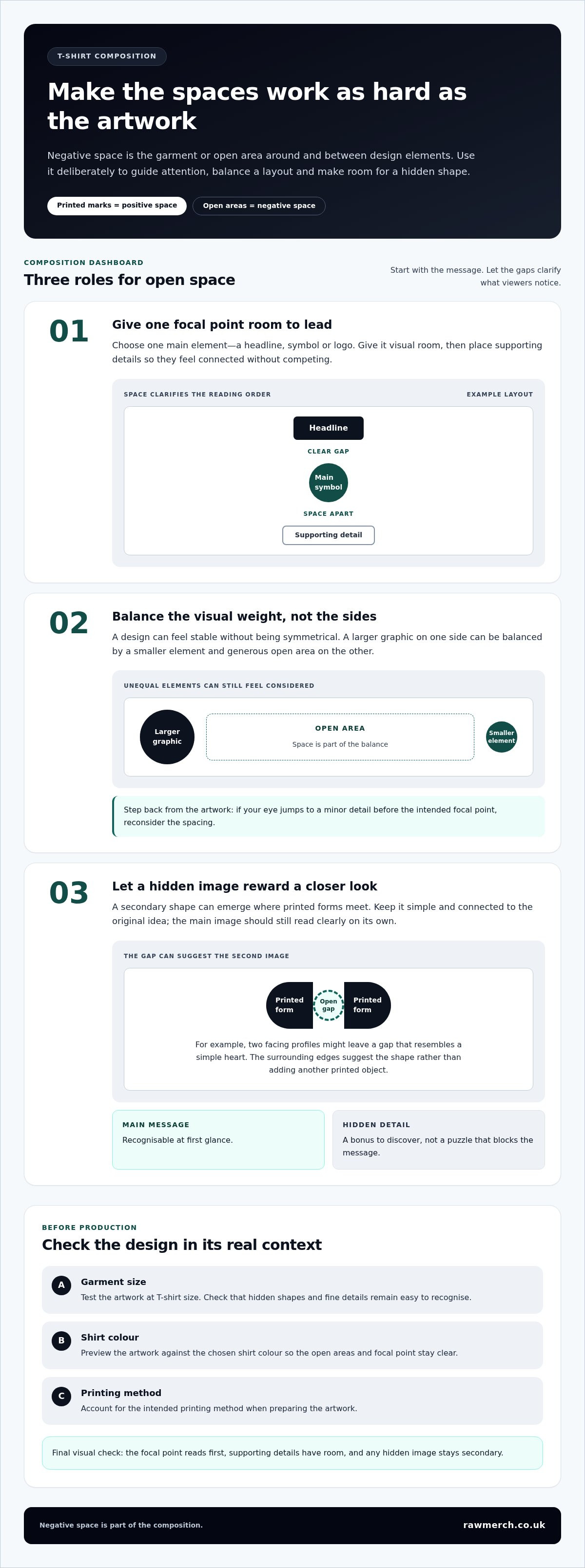
Start by choosing one main element. Give it enough visual room to hold attention, then place supporting details so they feel connected without competing. A headline could sit above a central symbol, for example, with a small line of text below it. Space between the components helps viewers recognise their order and purpose.
Compare a crowded layout with a deliberately spaced one. In the crowded version, the headline touches the symbol and a small detail sits close to both, creating one busy cluster. In the spaced version, the headline has a clear gap above the symbol, while the supporting detail sits apart beneath it. The artwork hasn’t gained new content; its arrangement simply makes the focal point easier to identify.
Balance isn’t a test of whether the left and right sides match. A large graphic on one side can be balanced by a smaller element and generous open area on the other. Consider the visual weight of each component, then adjust placement and spacing until the design feels considered. Step back from the artwork, too. If your eye jumps to a minor detail before the intended focal point, reconsider the spacing.
Build a Hidden Shape Without Making the Graphic Confusing
A secondary image can appear where shapes meet. For instance, two printed profiles facing each other might leave a gap that resembles a simple heart. The outline of a bold letter could also create a small symbol within its open counter. In both cases, the surrounding edges suggest the second image rather than adding another printed object.
Build the main graphic first. Check that its message or image is recognisable on its own, then see whether a gap could form a clear secondary shape. Keep that shape simple and connected to the original idea. If viewers need a long explanation to find it, or notice it before understanding the main message, reduce its prominence or remove it.
Effective hidden imagery still reads clearly at first glance, with the second image there to reward a closer look. That keeps the clever detail in its proper role: an optional discovery, not a puzzle that blocks the message.
Once the composition is ready for a garment, check that its spacing and focal point remain clear against the chosen shirt colour. RAW Merch prints custom T-shirts and emails a digital proof for approval before production. Explore custom T-shirt printing as you plan how your artwork will translate from screen to garment.
Negative Space T-Shirt Designs: Strong Composition vs Common Mistakes
Good spacing makes the relationship between shapes feel deliberate. Poor spacing can leave a design crowded, unclear or oddly empty. Negative space isn’t just a large blank patch around small artwork. It can appear between letters, inside a symbol or around a graphic. The test is whether each open area helps the composition read, not how much empty fabric there is.
Use this quick comparison to spot the difference:
| Intentional spacing | Crowding or weak spacing | What you’ll notice |
|---|---|---|
| Main image has room around it | Text and graphics press against the image | The focal point stands apart, or the design reads as one busy cluster |
| Gaps between elements feel consistent with their roles | Some elements nearly touch while others seem disconnected | The layout feels ordered, or the spacing appears accidental |
| Cut-outs and open details remain clear at print size | Small gaps collapse or become difficult to recognise | The detail is legible, or its shape becomes ambiguous |
| Open areas help define the overall silhouette | Blank patches don’t relate to the artwork | The composition feels balanced, or parts seem unfinished |
Signs the Negative Space Is Helping the Design
Start with a simple check: can someone identify the main subject without an explanation? Then inspect how the text, shapes and supporting details relate. Clear separation should help viewers distinguish elements without making them feel unrelated. Finally, look at the blank areas as shapes in their own right. If they support the graphic’s direction and proportions, the spacing is doing useful work.
For example, a headline can sit close enough to a symbol to feel connected while remaining separate enough to read clearly. The aim isn’t to maximise every gap; it’s to make each gap earn its place in the composition.
When Empty Areas Become Confusing or Fragile
Inspect narrow gaps, tiny islands of fabric and crowded cut-outs closely. At a small on-screen zoom, these details can look sharp but become hard to distinguish at the intended print size. There isn’t one minimum gap or line width that applies to every artwork and printing setup. The right level of detail depends on the design and production method.
Check the design at the size it will appear on the garment. Review the digital proof at that scale before approving production, paying particular attention to small open spaces and delicate shapes. If a cut-out is hard to recognise, simplify it or give it more room. Don’t assume that removing more ink will automatically make a T-shirt feel lighter: print coverage is one factor, while the ink, printing method and garment also affect the result.
How to Create a T-Shirt Design Using Negative Space
Start with the message, not the decoration. Before sketching, ask yourself: what is the one idea this shirt should communicate first? A short phrase, recognisable symbol or single image can each lead the design. Once that priority is clear, build the composition around it instead of filling every gap with another element.
Start With One Message and Map the Main Shapes
Keep the first draft simple. Mark the main printed shapes, then notice the open areas created between and around them. This gives you a practical starting point for using negative space in t-shirt designs. Work through the steps in order, adjusting each draft as you go.
- Set the message. Write down the key word, symbol or image the design must communicate. Keep supporting details secondary.
- Choose the main shape. Sketch the focal element in a simple form. Plan its position and scale before adding fine detail.
- Make quick thumbnails. Draw several small layouts. Try placing the main element centrally, off-centre or alongside a short headline, then compare the open spaces each arrangement creates.
- Map the gaps. Look at the spaces between letters, around symbols and inside shapes. Notice whether they feel connected to the design or awkwardly squeezed.
- Move or remove elements. If a layout feels crowded, shift a supporting detail or take it out. Don’t add artwork just to fill a blank area.
- Choose a direction. Compare your rough versions and select the one that communicates the main idea most clearly, with deliberate spacing.
Refine Spacing and Check the Design at Garment Size
Develop the chosen sketch, then test it at the size it will appear on the T-shirt. An enlarged screen view can make small gaps and delicate shapes seem clearer than they’ll look on the garment. Reduce the artwork to its intended dimensions and check whether key details remain distinct. If a gap disappears or a shape becomes hard to recognise, simplify or adjust it.
Next, place the artwork on a mock-up. Check its position, contrast against the shirt colour and overall balance. Look at it close up and from a normal viewing distance. The message should register without zooming in. A mock-up is a useful visual check, but review the final artwork in a digital proof before production, too.
RAW Merch provides a digital proof for custom T-shirt prints before production begins. Use it to review the artwork in context and make sure the composition matches your intended garment. Explore custom T-shirt printing for your project.
Prepare Negative Space Artwork for T-Shirt Printing
A negative-space design works only if the open areas remain clear on the finished garment. Those areas may show the shirt colour rather than printed ink, so review the artwork against the colour you plan to use. A gap that stands out on a white screen may blend into a similarly coloured garment, changing the contrast around letters, symbols or cut-outs.
Consider the garment and artwork together, then factor in the print method. DTF, screen printing and sublimation have different artwork considerations, so don’t assume a fine detail or open shape will behave identically across all three. There’s no universal minimum gap that guarantees every detail will print clearly. Suitability depends on the specific artwork and production method.
Check Colour, Contrast and Production Method
Preview the design on a mock-up in the chosen shirt colour. Check that the garment colour creates enough contrast around the main shapes and lettering, including cut-outs that rely on fabric showing through. If an open space disappears visually, adjust the surrounding shapes, change the artwork colours or reconsider the garment colour.
Before preparing a final file, review these points:
- Contrast: Can you distinguish the main artwork and essential open shapes from the shirt colour?
- Fine detail: Are narrow gaps and delicate cut-outs still distinct at the intended print size?
- Print method: Has the artwork been considered for the chosen method, rather than treated as interchangeable across DTF, screen printing and sublimation?
- Placement: Does the full composition look balanced where it will sit on the garment?
These checks help catch design issues early. If a detail looks fragile or ambiguous, simplify it rather than relying on a particular gap size to work in every production setup.
Review Artwork and Approve the Digital Proof
Send a clear artwork file. Vector artwork is useful for logos and text that need to scale; raster artwork should be prepared at the intended print dimensions so its detail can be assessed at realistic size. Keep a copy of the approved version, especially if you make revisions.
Use the digital proof to inspect the artwork in context. Check the garment colour, design placement and overall contrast, then look for missing details, closed gaps or areas that appear filled when they should remain open. Zoom in to examine fine shapes, but also view the design at its intended size. This gives you a practical sense of whether the negative-space effect reads clearly on the garment.
At RAW Merch, a digital proof is emailed for approval before production begins. Review it carefully: once you approve the proof and payment is received, production begins. Taking time over the final check helps ensure the approved artwork reflects the design you intend to print. To put your artwork into production, explore custom T-shirt printing with RAW Merch.
Give Your Next T-Shirt Idea Room to Work
Your next design doesn’t need to start with a finished graphic. Start with one message, then sketch a few ways the surrounding shapes and open areas could support it. A small change in spacing can shift the feel of a composition, so test alternatives before settling on a layout. That’s the creative value of using negative space in t-shirt designs: it lets the shirt and artwork work together to express an idea.
When you’re ready to move from concept to garment, RAW Merch brings over 25 years of experience in custom printing and merchandise. A clear artwork file and considered design give production a strong starting point, while a digital proof lets you review the artwork before production begins.
Explore custom T-shirt printing with RAW Merch and take your idea into production. Start with the message that matters, give it space to stand out, and build a T-shirt design that feels unmistakably yours.
Frequently Asked Questions
What is the difference between negative space and white space?
Negative space describes the area around or between the main elements in a composition. “White space” is a common design term for open areas, but they don’t have to be white. On a T-shirt, the fabric itself might form that area, or the gap could sit between two printed shapes. For example, a navy shirt showing through a logo can create negative space just as effectively as a white one.
Can negative space be used in typography?
Yes. Letters contain open counters, such as the space inside an “O”, and gaps between letters or words can contribute to a text-led design. Keep the wording understandable before adding a visual twist. For example, a short slogan might sit inside a simple outline, with the fabric showing between the letters and border. Check that the phrase still reads naturally, not as separate or confusing fragments.
Does negative space have to be the colour of the T-shirt?
No. Negative space describes what an area does in the design, not its colour. It might be unprinted fabric, a gap between printed shapes or an open region created by the layout. If you’re comparing garment colours, place the same artwork on each option and look at the smallest important shapes first. A colour that suits the overall look may still reduce contrast around a letter, symbol or cut-out.
Can negative space work in a photographic T-shirt design?
Yes, if the open area supports rather than distracts from the photograph’s subject. For example, a portrait could be cropped to leave a clear area beside the face for a short caption, or its outline could sit apart from another graphic. Avoid forcing a hidden symbol into a photograph if it competes with the image. Review the complete layout at its intended size, since subtle edges can be harder to distinguish when reduced.
Does negative space make a T-shirt design look larger?
It can make the focal element feel more prominent by giving it separation, but it doesn’t increase the physical size of the printed artwork. To judge the effect, compare two mock-ups using the same print dimensions and garment placement. One can have tighter surrounding details, while the other gives the main graphic more open area. If the second feels clearer but not oversized, the spacing is affecting perception rather than actual scale.
Can negative space work with a simple, text-only T-shirt design?
Yes. Spacing can give a text-only design structure without adding an illustration. Try setting a short headline on two lines, then compare a compact layout with one that uses more room between the lines or around a key word. Keep the reading order obvious. If the spacing makes the phrase feel disconnected, adjust the line breaks or alignment. The finished wording should make sense before anyone notices the layout technique.